· The BackupRidge team
Since June, BackupRidge has gone from version 1.26 to 1.40 — fifteen releases in about ten weeks. Most of them were small and boring, which is exactly how we like backup software to move. But a few of them added things worth telling you about in one place, because together they change what the plugin is: it started the summer as a backup plugin, and ended it as the thing standing between your site and a bad update.
Here’s what shipped, why each piece exists, and — because this is a backup product — how you can check that any of it actually works.
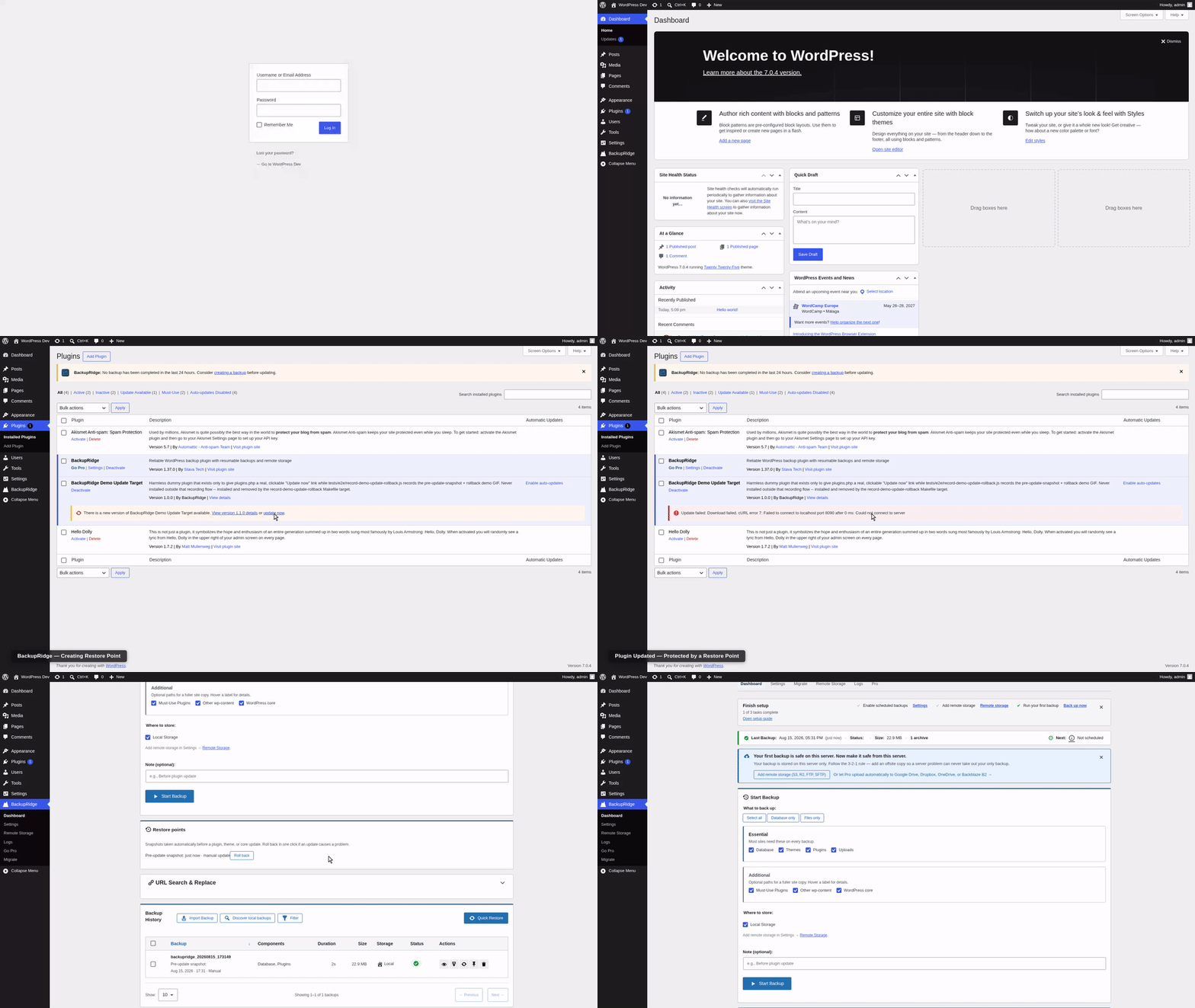
Your site now backs itself up before every update — and rolls back in one click
Free, on by default, since 1.34.0.
The most common way a WordPress site breaks isn’t a hack or a server failure. It’s a Tuesday-afternoon plugin update that was supposed to take ten seconds. And the worst version of it isn’t even the update you clicked — it’s the one WordPress ran by itself at 3 a.m. via auto-updates, so the first you hear of it is a customer emailing to say your site is down.
BackupRidge now takes a snapshot before every plugin, theme, and core update — whether you clicked Update in wp-admin or WP-Cron ran it unattended. A Restore Points widget sits on your dashboard, and if an update breaks something, rolling back to the moment before it is one click. Not “find the right backup in your history, download it, restore it, hope.” One click.
This is free. Not free-trial, not free-for-one-update, not free-until-you-need-the-restore. Several plugins in this space sell backup-before-update as a premium feature; we think it’s the single most likely moment you’ll ever need a backup, so it belongs in everyone’s install.
Cloud storage without the OAuth homework
Google Drive, Dropbox, and OneDrive — Pro, via Quick Connect.
Connecting a backup plugin to Google Drive used to mean a trip to the Google Cloud console: create a project, configure an OAuth consent screen, generate credentials, paste keys around. It’s a rite of passage nobody asked for.
Quick Connect replaces all of that with the flow you already know from every other app: click Connect, approve access in Google’s (or Dropbox’s, or Microsoft’s) own window, done. We run the relay infrastructure that makes this possible — which costs us money per active site, and is the honest reason these three providers are Pro rather than free.
If you’re on the free plugin, you’re not locked out of offsite backups: local folders, FTP, SFTP, Amazon S3, and Cloudflare R2 — which has a generous free tier of its own — are free, with unlimited simultaneous destinations and no size caps.
Keep a year of history without keeping a year of storage bills
Grandfather-Father-Son retention — Pro, since 1.36.0.
“Keep the last 10 backups” is fine until you realize what it means: with daily backups you can never look back more than ten days. That corrupted table nobody noticed for three weeks? Gone from every backup you still have.
GFS retention keeps a shrinking set of daily, weekly, monthly, and yearly backups — recent history at full resolution, older history at decreasing resolution, a year of coverage from a couple dozen archives. You can configure it globally or per schedule, and — this is the part we’re proud of — before you save a policy, a preview shows you exactly which of your existing backups it would keep and which it would delete. A retention policy is a machine that deletes your backups; you should get to watch it dry-run before you switch it on. Every kept backup also gets a badge in your history explaining why it was kept (daily, weekly, monthly, yearly), so the policy’s decisions are never a mystery.
Incremental backups that can’t strand you
Redesigned around a differential model — Pro, since 1.29.0.
Traditional incremental backups form a chain: each one stores the changes since the previous one, so restoring Wednesday needs Monday’s full backup plus Tuesday plus Wednesday — and every link in between, intact. One damaged or expired archive strands everything after it. That failure mode is quiet, and you discover it at the worst possible moment: during a restore.
We rebuilt incrementals as differentials. Every incremental backup now stores the delta since the last full backup, so a restore needs exactly two archives: the baseline plus the one you chose. There is no chain to break. And as of 1.36, verification checks the baseline itself hasn’t degraded since it was created — because “your differential is fine but its baseline rotted” is exactly the kind of thing a backup product should catch before you need it, not during.
Back up a 10 GB site on a host with 2 GB free
Rolling upload mode and disk-space preflight — free, since 1.40.0.
On cheap hosting the thing that kills a backup most often isn’t time or memory. It’s disk. A backup plugin builds the archive locally first and uploads it afterwards, so backing up a 10 GB site needs roughly 10 GB of free space on a server that was sold to you with 20 GB total. The backup dies at 80% with “No space left on device,” or worse, fills the disk your live site is running on.
Rolling upload mode changes the order of operations: as each archive part is finished, it is uploaded to every destination and deleted locally before the next part is written, so the backup only ever needs room for roughly one part, not the whole site. It only engages when every destination is remote, and it is opt-in, off by default — because there is a real trade-off, and we would rather you choose it knowingly: if an upload fails partway through a rolling backup, the earlier parts are already gone from local disk, so a recoverable “backup failed, retry” becomes “no usable backup from this run.” On the host this exists for, the alternative is that the backup could not be built at all.
Around it, 1.40 adds the checks that should have existed everywhere years ago: a pre-backup preflight compares the backup’s estimated size against free space on the backup volumeand remaining quota at each remote destination, and fails up front with a plain diagnosis instead of forty minutes in — pointing at rolling mode when that would have made the backup fit, or switching into it automatically if you already turned it on. A configurable free-space reserve guarantees a backup can never take the last gigabyte from the disk your live site runs on. The same preflight now guards restores, which can also stream a remote archive in rather than downloading all of it first. And when a write fails with a full disk even though PHP’s free-space figure said there was room — common on quota-limited shared plans — the failure is diagnosed as disk-full immediately, with what to do about it, instead of surfacing a raw library error and burning through a string of pointless retries.
A progress bar that tells the truth
Per-destination upload progress and honest ETAs — free, since 1.39.0 and 1.40.0.
A backup’s upload phase used to show the finished-looking totals from the archiving phase: 100% of files, all the data, done — while the actual upload was at part 3 of 40. The dashboard now shows which part is going to which destination, an “Uploaded” row that reflects real bytes across every destination, and a time estimate that names the phase it is estimating and says when, and why, it has stopped trusting itself. Log lines use your destinations’ display names rather than config ids. Small things, all of them; together they mean “is it stuck or is it slow?” has an answer you can read off the screen.
Retention that shows its work
Free in count mode, Pro for GFS tiers — since 1.40.0.
Backup History now marks the backups your current retention policy will delete next, so nothing disappears that you didn’t see coming. Tightening a policy in Settings — from keep-10 to keep-3, say — asks you to confirm the backups that change would delete before it applies, instead of quietly deleting them on the next run. A retention pass that the host kills mid-flight now resumes where it left off rather than leaving half a job, a deletion that fails at one remote destination can no longer wedge every later pass, and when a pass is capped or deferred you get a dashboard notice that says what it needs from you. Pinned backups sit at the top of the history table, and fileless rows are hidden by default.
Send job events wherever you need them
Advanced webhooks — Pro, since 1.37.0.
The free plugin already fires a webhook to one URL when a backup job finishes — enough for a simple Slack ping or status page. Pro now fans that same event out to as many endpoints as you configure, each with its own JSON or plain-text payload template, custom headers, and HMAC-SHA256 request signing, so whatever’s on the receiving end can verify the request actually came from your site. A new phase_transition event fires as a backup moves through init, database, files, archive, upload, and finalize, for anyone automating something finer-grained than “done or not.” And a failed delivery now retries with backoff instead of being dropped the first time your endpoint hiccups.
Trust, but verify — then verify again
Deeper archive and restore verification, free, since 1.36.0.
A backup that reports success and quietly isn’t restorable is worse than no backup at all — at least no backup doesn’t lull you. So this summer we made the plugin more suspicious of its own output:
- Every backup now embeds a per-file identity manifest in the archive, and post-backup verification checks the archive’s actual contents against it, name by name. A missing or duplicated file gets caught at backup time — not restore time.
- Before a restore starts extracting, it verifies every archive part is present, readable, and non-empty — instead of proceeding on an archive set that quietly lost a part somewhere along the way.
- A corrupted part that still passes size checks gets caught against the manifest during restore.
None of this makes for an exciting settings screen. All of it decides whether the restore works on the day the restore is the only thing that matters.
Also in 1.40
- (Pro) License responses from our server are now required to carry a valid Ed25519 signature — the log-only check from 1.36 is now enforced, so a spoofed license server can’t grant or revoke features.
- Multipart uploads to Backblaze B2, Google Drive, and OneDrive that fail at the completion step now back off and retry the completion alone, with the provider’s real error in the log, instead of re-uploading every part on every attempt.
- Remote orphan review now recognizes archives left at an older OAuth-provider root folder, so backups from before a folder-layout change can be adopted or cleaned up instead of sitting invisible.
- Tested up to WordPress 7.1.
The part you can check yourself
Every claim above is the kind of thing every backup plugin says. So here’s the part that isn’t: we publish our restore tests.
Every BackupRidge release goes through an automated drill against a real WordPress site: take a backup, wipe the site, restore it, verify the result. The outcome is published at backupridge.com/restore-log — and if a release fails the drill, the FAIL row is published too. That’s the whole point. A restore log that only ever shows green would just be marketing; the standing commitment to publish the red rows is what makes the green ones mean something.
We built BackupRidge because backups have a trust problem: you find out whether yours work at the exact moment it’s too late to do anything about it. The restore log is our answer. Don’t trust us — check.
What’s free and what’s Pro, plainly
Free — the full backup safety net: scheduled automatic backups, one-click restore, pre-update snapshots with rollback, disaster recovery (install fresh, reconnect storage, adopt your old backups — even from a different domain), site-migration receive, rolling upload mode and disk-space preflight for tight hosts, per-destination upload progress, and unlimited simultaneous storage destinations across local, FTP, SFTP, Amazon S3, and Cloudflare R2. No backup size caps, no ads in your dashboard, no restore paywall.
Pro — convenience and scale on top: Google Drive, Dropbox, and OneDrive via Quick Connect, Backblaze B2, incremental (differential) backups, archive encryption, backup verification, advanced per-schedule settings, GFS retention, advanced webhooks, and migration push/staging.
The free tier is not a demo. If it covers your needs, use it forever with our blessing.
What’s next
The per-release rhythm continues — each release gets a changelog entry written for humans (the full history is at /changelog) and a restore-log row, pass or fail. If you try BackupRidge and something doesn’t work on your hosting, that’s exactly the feedback we want: tell us.